
This is the phase Plan and payment ("Pick a plan and add a card") in Quick Setup. The screen is Choose your plan.
Under Billing, choose Monthly or Yearly. Yearly saves you two months.
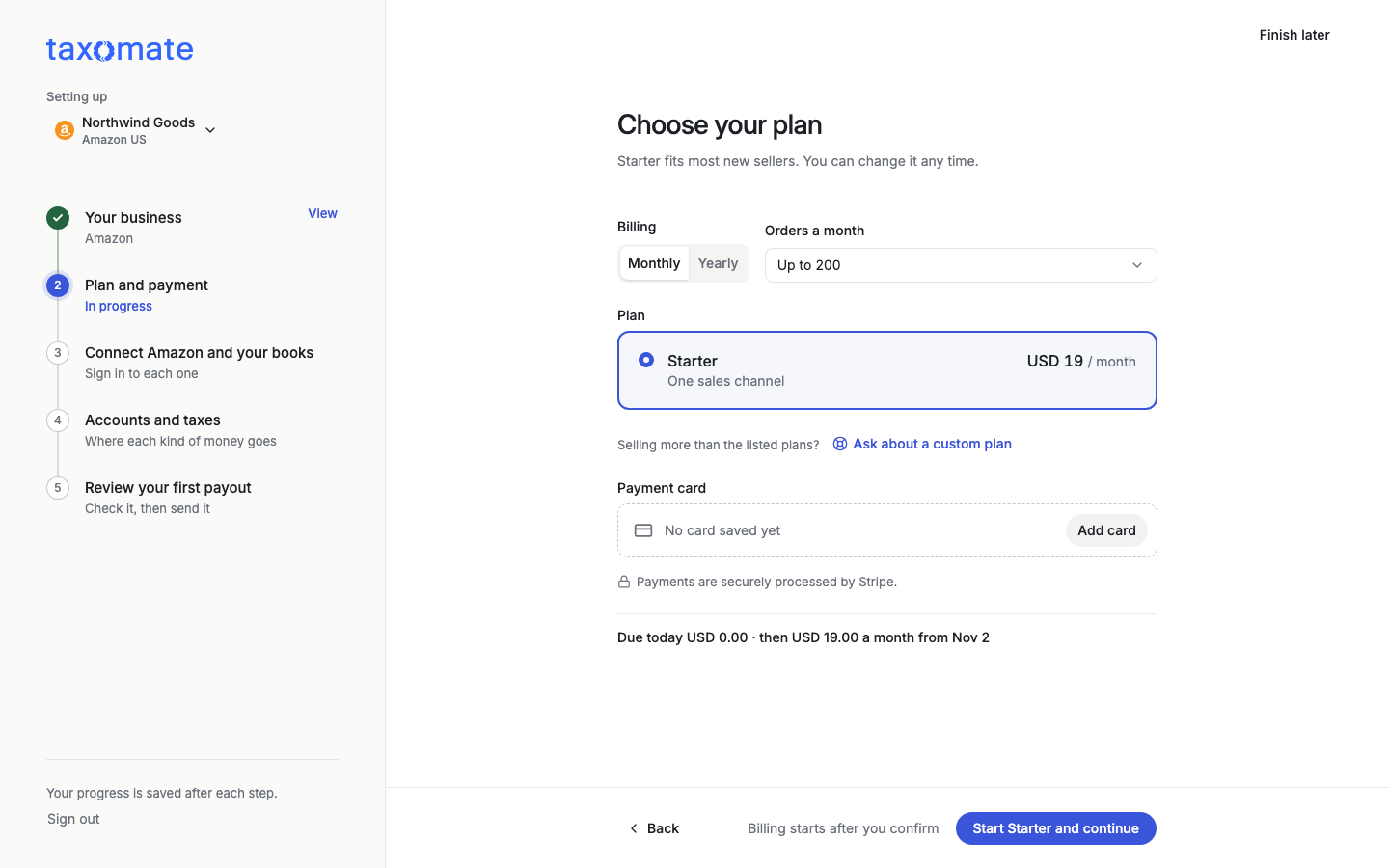
Choose Orders a month (for example "Up to 200"). If your order count changes, Taxomate can move you to the next plan when you pass your limit.
Check the Plan. Taxomate selects one for you: Starter (one sales channel), or multi-channel if your accounts need it. Change it if you want. For more channels than the plans list, select Ask about a custom plan.
Select Add card (Replace card if a card is already saved). Payments are securely processed by Stripe. After the card is saved, the card form closes.
The line at the bottom shows the price, for example "Due today USD 0.00, then USD 19.00 a month from {date}". Billing starts after you confirm.
Select Start {plan} and continue (for example Start Starter and continue).
You are not charged until the 14-day free trial ends. You can cancel before then.
If your accountant or bookkeeper pays for Taxomate for you, this step does not ask you to choose a plan or add a card.