Analytics shows your profit after fees and product costs. It uses settlements (Amazon) or payouts (other channels) whose period ended in the dates you choose. It does not use order dates.
It has up to four tabs: Overview, By marketplace, By SKU and Inventory valuation. By marketplace shows only for Amazon and eBay accounts.
Set Start date and End date, then select Apply. On the Overview, Analytics shows one marketplace at a time. Change the marketplace in the account switcher at the top of the sidebar (it shows, for example, "Amazon US · QuickBooks").
If the dates have no settlements, the page says "No settlements ended {dates}" (or payouts) and "Reports use settlement end dates for {marketplace}. Change the period or marketplace above."
A new account shows "Analytics start with your first settlement" until Taxomate imports one.
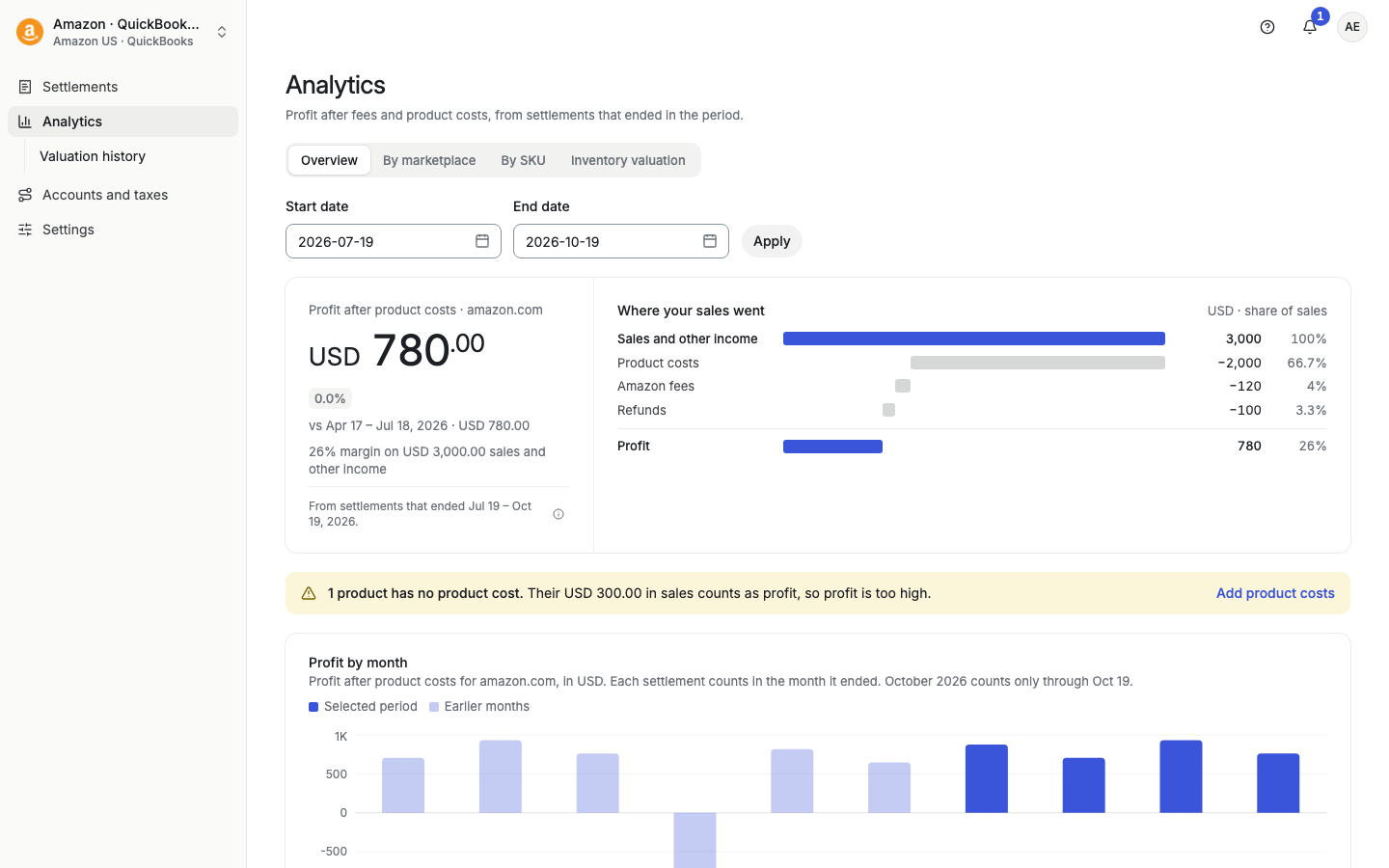
The big number is your profit for the period in the currency of the marketplace. Under it:
A change against the previous period. The previous period has the same number of days, right before your start date. If there is no earlier period, the page says so.
Your margin: profit as a share of sales and other income.
Select How this is calculated for the full rule. Profit is sales and other income minus marketplace fees, advertising, refunds and product costs. Product costs use the unit costs you saved. A product with no saved cost counts as zero.
A list from your sales and other income down to profit. Each cost line shows its amount and its share of sales. Costs such as fees, advertising, refunds and promotions, and product costs are in order of size. The last line is Profit.
A yellow notice. Products with no saved cost count as zero cost, so profit is too high. Select Add product costs to open Default costs. See "Updating COGS after changing Default Costs".
A bar chart with one bar per month. Each settlement counts in the month it ended. Months in your chosen dates are solid. Earlier months are lighter. If the last month is not over, the chart says it counts only through your end date. Point at a bar to see the month's sales and other income, fees, refunds and promotions, product costs, and profit.
Two lists of products that have a saved cost. Gross profit is sales minus product cost. Fees are not split by product. Select All {n} products to open By SKU. Products without a saved cost, or whose cost is in a different currency from the sales, are left out of these lists.
Shown if your account has more than one Amazon or eBay marketplace and at least two had sales. Each marketplace shows Sales, Profit and Margin in its own currency. Compare margins, not amounts, because amounts are not converted between currencies. Select Compare in detail to open By marketplace.
Select Profit and loss detail to open the full table with every income, fee and cost line for the marketplace.
A table with one column for each marketplace you choose (up to five) in Marketplaces (up to five). Each marketplace uses its own currency. Amounts are not combined across currencies.
A table of products with these columns: Product, sold units (FBA sold and MFN sold for Amazon, Sold for other channels), Average sales/day, Sales revenue, COGS, Profit and Profit margin.
Search with SKU or product and Apply. Search covers every row of the report.
Use Sort by and Sort direction.
The report covers all marketplaces in the account. COGS uses your accounting currency. Revenue and profit use each row's currency. Amounts are sorted within each currency, with no conversion.
If product costs and sales are in different currencies, profit is not shown as comparable.
Stock on hand and its value at cost, for one marketplace.
Cards: Low Stock, Out of Stock and Total Value. Select a card to filter the table.
Table columns: Product, SKU, Total supply (Amazon), In-stock supply and Total value. Select a column name for what it means. Total value is in-stock supply (or total supply, depending on your setting) multiplied by cost.
Search by Search SKU prefix.
Amazon accounts also have Valuation history: saved month-end valuations. For each one you can Review it, Export CSV, or Rebuild with current costs. Rebuild replaces the saved valuation with amounts from your current Default costs. It does not post to your accounting software. See "Amazon Inventory Valuation History".
Taxomate reports by settlement end date, not by order date. See "Comparing Taxomate with Amazon Dashboard".
