Taxomate has three ways to undo or hide a settlement. They do different things. Amazon accounts see Settlements. Other channels see Payouts. The steps are the same unless this article says otherwise.
I want to... | Use |
|---|---|
Remove what Taxomate sent from my accounting software, then send again | Delete entries from your accounting software |
Hide a settlement I do not need, and keep everything | Archive (undo with Restore) |
Clear the "sent" status after Delete entries failed (Amazon only) | Mark as not posted |
Rebuild a settlement with new mappings | Rebuild. Delete the entries first if it was sent. |
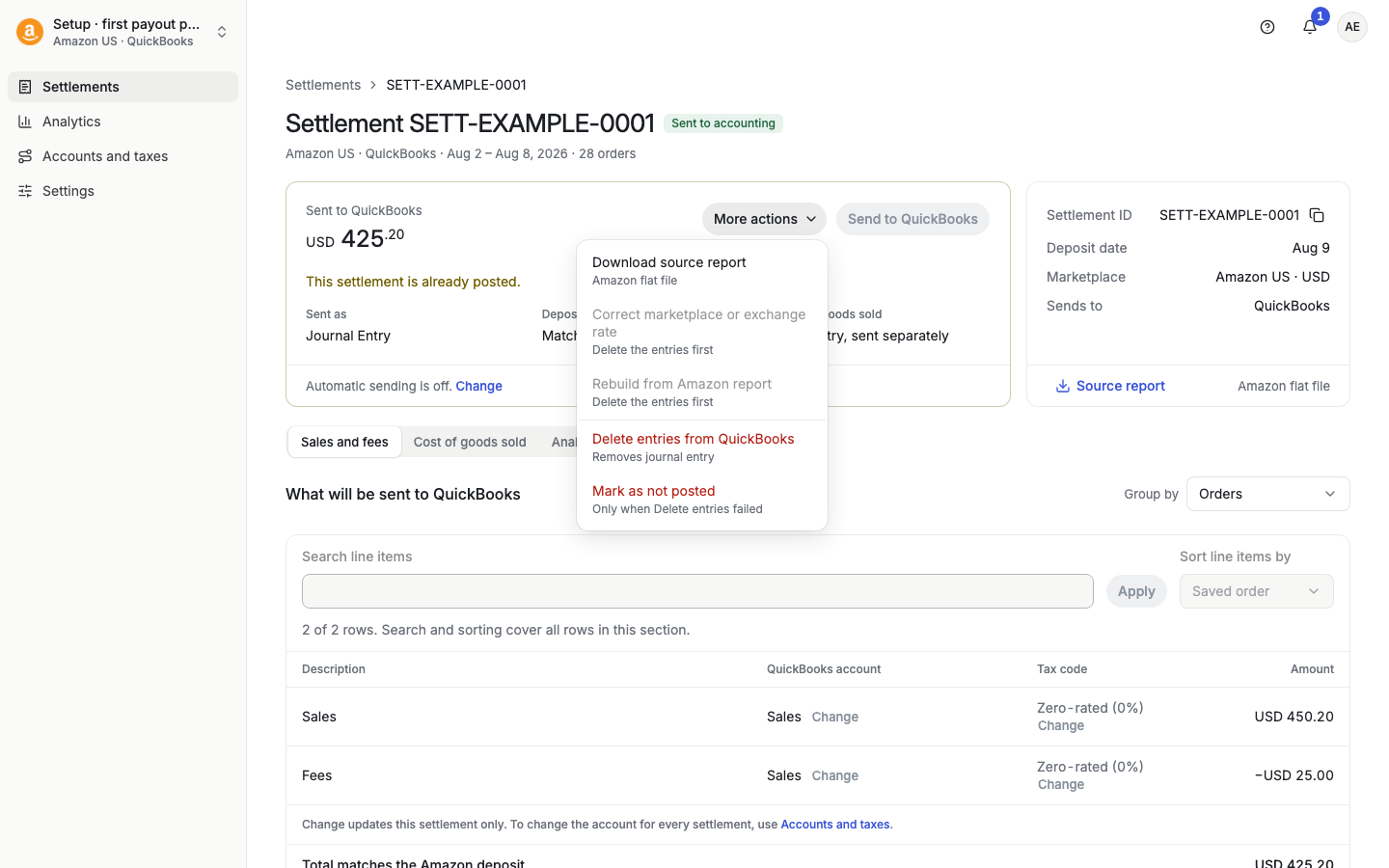
What it does. Taxomate deletes or voids the saved sales and fee entries in your accounting software. The settlement and its cost of goods sold (COGS) stay in Taxomate. Then you can send the settlement again.
Where. Open the settlement. Select More actions, then Delete entries from QuickBooks (or Xero, or Wave). It shows only after something was sent. For several settlements, select the rows and use More actions > Remove entries > Delete accounting entries. On a payout, open it and select More actions > Delete entries from your accounting software. The bulk item for payouts is also Delete accounting entries. COGS entries have their own item, Delete COGS entries.
Before you start.
If the entries are matched or reconciled with a bank payment, unmatch them first. See the delete article for your software.
Turn off Automatic sending. If it is on, Taxomate can send the settlement again after you delete it. The dialog warns you: "Automatic sending is on. The settlement may be posted again after deletion."
When it is greyed out or refused. The page tells you why. Examples: a send or rebuild is still running; there are no saved entries to delete; the settlement needs review before deletion can be tried; or the saved history does not match the connected accounting software.
If a send stops half way. When part of a settlement is in your accounting software, the page shows Partly sent · needs cleanup. Delete the entries, check your accounting software, then send the whole settlement again.
What it does. Archive hides the settlement from the active list. Its data and its accounting entries stay. Nothing is removed from your accounting software.
Where. Select ⋯ on a row, then Archive. Or select rows and use More actions > Manage settlements > Archive settlements. To see archived rows, use Filters and the Archived filter. Archived rows show Restore in the row menu. Restore settlements returns them to the active list. An archived payout must be restored before you can send it.
When it is not offered. You cannot archive a settlement with sent entries ("Sent entries cannot be archived.") or with sent COGS ("Entries with sent COGS cannot be archived."). Delete the entries first.
Use it for settlements you never plan to send. It is not a way to remove entries from your books.
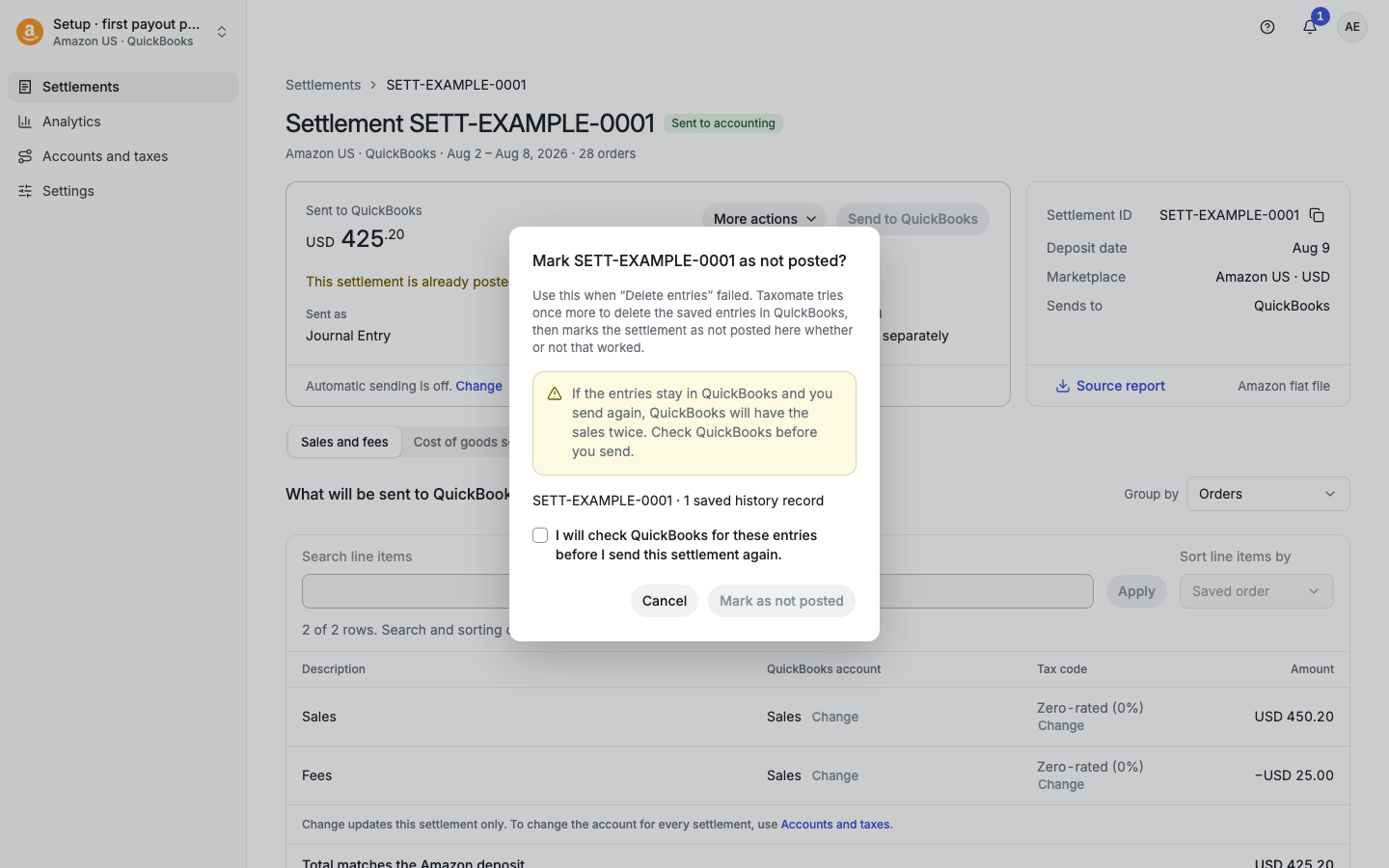
What it does. Taxomate tries once more to delete the saved entries in your accounting software. Then it marks the settlement as not posted in Taxomate, whether or not the delete worked.
When to use it. Only after Delete entries failed. The button says so: "Only when Delete entries failed."
Where. On an Amazon settlement that has been sent: More actions > Mark as not posted. It is not offered for other channels. It is off while sending is on hold. In that case, contact support.
The risk. If the entries stay in your accounting software and you send again, your books will have the sales twice. The dialog asks you to confirm: "I will check {your accounting software} for these entries before I send this settlement again." Check first. Remove any entries that remain.
Rebuild recalculates a settlement from its source report with your current mappings and settings. It is not offered once anything is sent. The page says "Delete the entries first". See "What does Rebuild do?".
Action | QuickBooks, Xero, Wave |
|---|---|
Delete entries | Taxomate deletes or voids the saved sales and fee entries in your accounting software. QuickBooks: Taxomate deletes the entries. It voids an invoice instead when Allow undoing posted invoices is on in Settings > Invoice. Xero: Taxomate deletes an invoice that is not approved yet, and voids an approved or paid invoice. Wave: Taxomate deletes the invoice. |
Archive, Restore | Nothing changes. |
Mark as not posted | Taxomate tries to delete the saved entries once more. Entries may remain. You must check. |
Rebuild | Nothing changes in your software. Rebuild is blocked after a send. |
Taxomate removes only the entries it saved for this settlement.
A message says "Some entries may already be in {software}" or "Deleting is in progress" and it does not clear.
Delete entries and Mark as not posted are both unavailable and the settlement is stuck.
You are not sure if entries are still in your books.
See "What does this settlement status mean?".
