Note: This feature is in beta. Please tell us if you see a problem.
This feature is for Xero only. You can map each SKU to a Xero item. Taxomate then adds the item code and the number of units to the sales lines of that SKU. Xero's Sales by item report then shows your marketplace sales for each item.
Xero does not track stock for these items. Taxomate continues to send cost of goods sold (COGS) the same way as before.
Connect a sales channel and a Xero organisation.
In Xero, add each item under Products and services. Do not select Track inventory item. Taxomate cannot use a tracked item, because Xero changes its stock and records its own COGS for each sale.
Go to Settings > Invoice. Set Xero invoice lines to Detailed and set Group sales by to SKU. For Shopify, Orders also works. With Summary lines, or with sales grouped by Transaction types, Taxomate does not add item codes. For Amazon and other channels, an order line can contain more than one SKU, so Taxomate does not add item codes when sales are grouped by Orders.
Go to Settings > SKU mappings.
Find the SKU. Use Unmapped to show only the SKUs that have no Xero item, or search by SKU or product name.
Open the Xero item list for the SKU and select an item. Tracked items show Tracked item, not available, and you cannot select them.
Taxomate saves the item and shows its code next to the SKU.
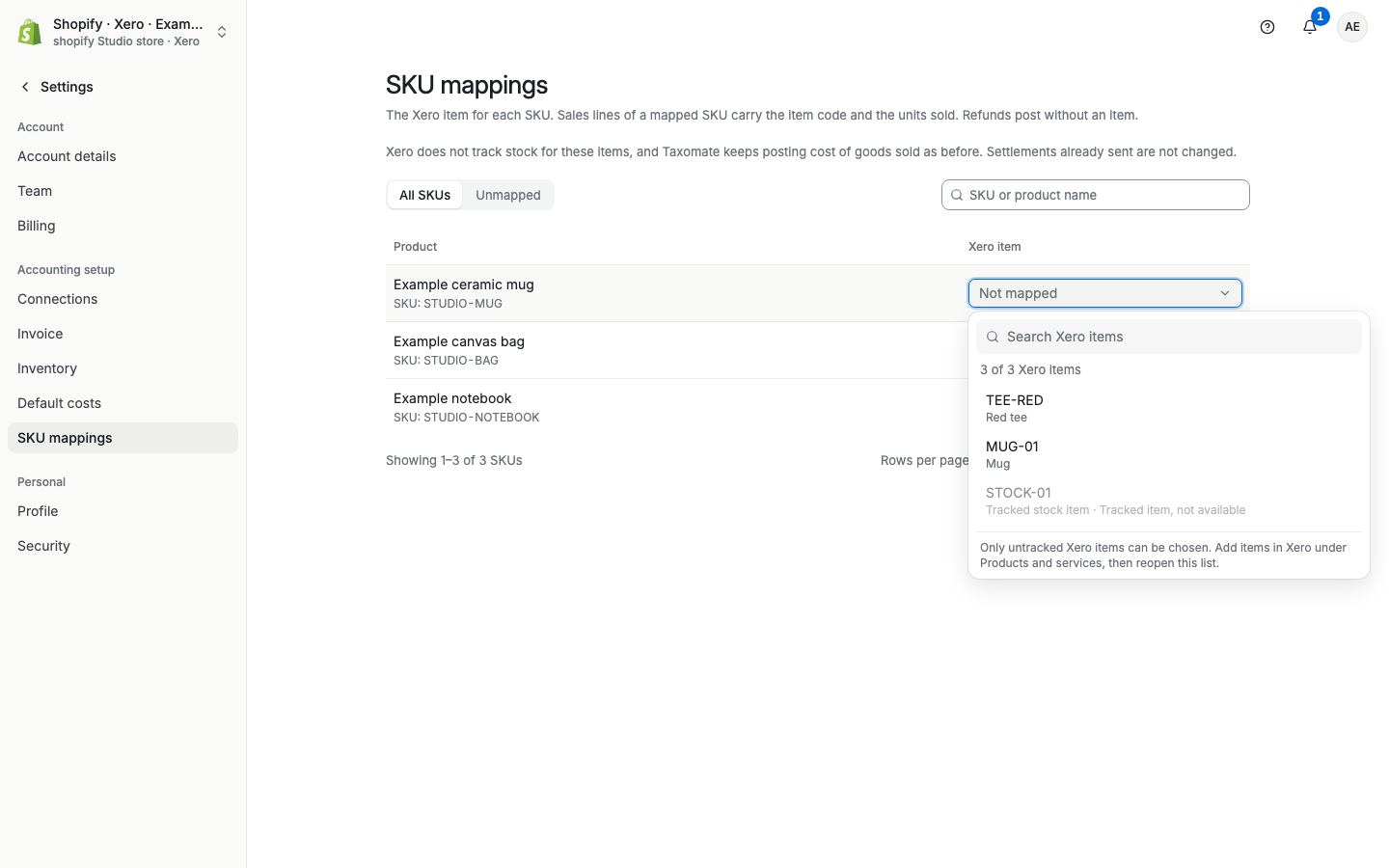
To remove an item from a SKU, open the list and select Not mapped.
If Taxomate cannot confirm a change, a message tells you that editing is paused. Select the button in the message to check the saved mappings. Then make the change again if necessary.
Each sales line for a mapped SKU has the Xero item code and the number of units.
Refund lines do not have an item code. Xero does not subtract refunded units in Sales by item, so the report shows units sold before refunds.
If the line amount does not divide equally by the units, Taxomate sends two lines for the SKU: one line with all the units except one, and one line with the last unit. The two lines add up to the exact amount. If two lines would change the tax by a cent, or if the line has the VAT that Amazon calculated, Taxomate sends one line with a quantity of 1.
Fee, shipping, tax and COGS lines do not have an item code. Lines without units sold, such as a promotion, also do not have an item code.
A settlement with a negative total posts to Xero as a bill. Bills do not have item codes.
The line keeps the account and tax rate from your mappings. The item does not change them.
This applies to settlements and payouts that you send after you map the SKU. Settlements already in Xero do not change.
If you delete or archive a mapped item in Xero, or change it to a tracked item, Taxomate does not send the settlement. The message shows the SKU and the item code. Select Open SKU mappings, then select another item or select Not mapped. Then send the settlement again.
If you delete an item in Xero after Taxomate sent a settlement that uses it, Xero cannot void that invoice. Add the item again in Xero before you undo the settlement in Taxomate.
