Taxomate holds a settlement when a required account or tax mapping is missing or is not valid for your accounting software. In the list, the row shows Review mappings and says which transaction type has no account. On the settlement or payout page, a Mappings need review message says sending is on hold until each transaction type has an accounting mapping.
Select Map 1 type on the row, or Review mappings on the settlement page. Or open Accounts and taxes in the sidebar. If you start from a settlement or payout, a Back to link at the top of the page takes you back to it.
Next to Mappings for, choose the marketplace of the settlement.
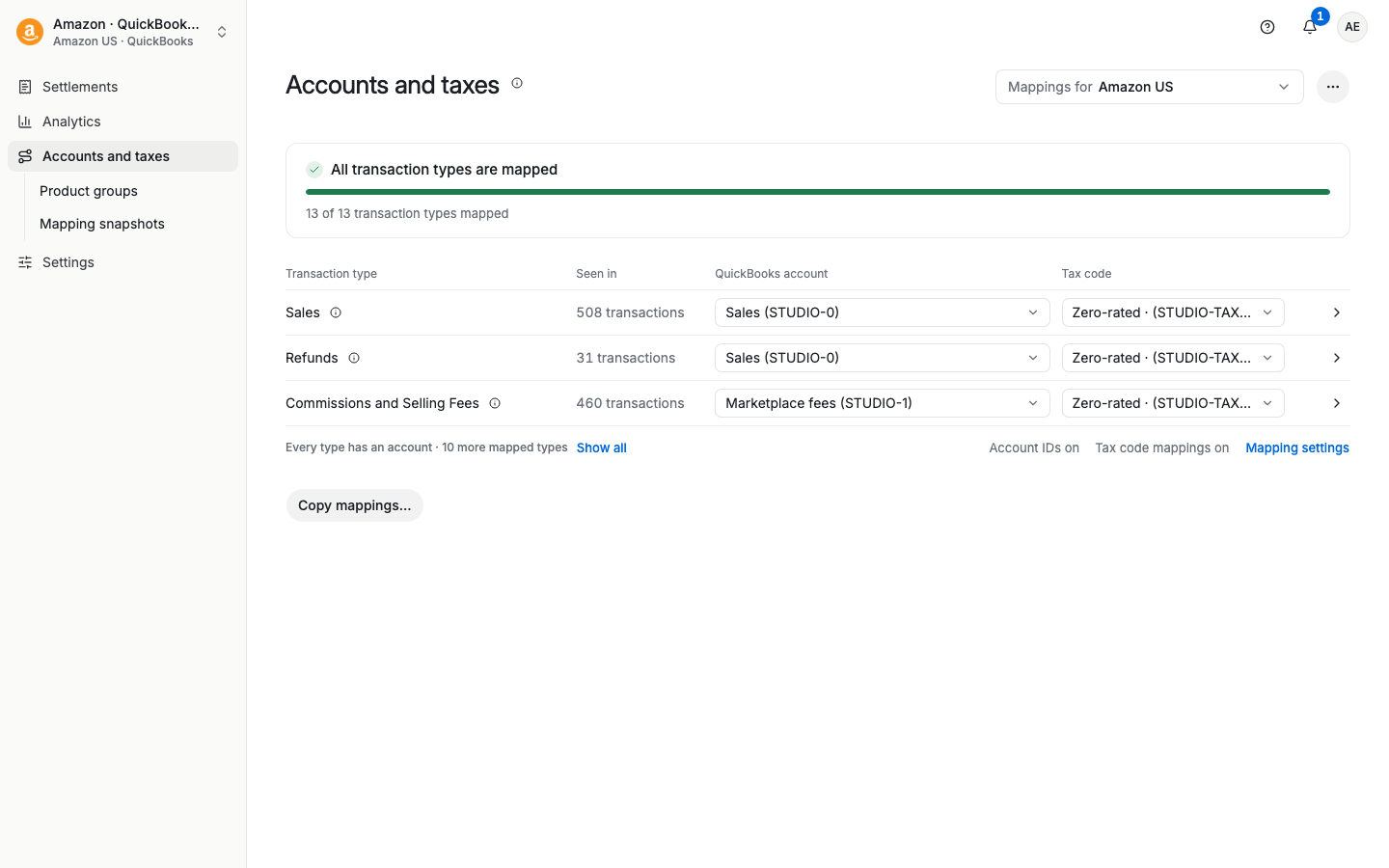
Types without an account are listed first. They are marked Required or Not set. Find the transaction type from the warning.
If you cannot see it, select Show all, or open Mapping settings and turn on Show all sub accounts.
Select the income or expense account your accountant wants for that type. Select the tax code too, if your setup uses tax codes (turn on Tax code mappings in Mapping settings first).
The bar at the bottom shows how many changes are not saved. Select Review and save, read the review, and confirm. If you try to leave the page first, Taxomate asks Leave without saving? Select Stay on this page to keep your changes.
Rebuild the settlements that are not sent yet. If you started from a settlement or payout, a message says Saved. 3 unsent settlements used the old mappings. Select Rebuild 3 and go back. If you started from the sidebar, open the settlement and select Rebuild. Then review it and send it.
The image below shows the completed state: All transaction types are mapped. Before you finish, a missing account shows Required or Not set.
When a settlement is not sent because a type has no account, its page says so. For example: "Not sent. Sales has no account. Map it in Accounts and taxes, and Taxomate sends again automatically." Select Review mappings, map the type, then rebuild. If Automatic sending is off, the text ends "then send it again." If Taxomate cannot name the type, the text says "Not sent. Check your mappings and tax settings in Accounts and taxes."
This is common. Check these causes in order.
You did not rebuild. A settlement keeps its list of unmapped types from the time it was imported or last rebuilt. A mapping that you save later does not change a settlement that is not sent yet. Open the settlement and select Rebuild. If you saved from a settlement or payout, select Rebuild N and go back in the message after you save.
You looked at another marketplace. Accounts and taxes shows one marketplace next to Mappings for. Select Review mappings on the settlement page instead. It opens the page for the marketplace of that settlement.
You did not save. The bar at the bottom shows how many changes are not saved. Select Review and save and confirm.
The type is a sub account. A category can look mapped while one line item under it has no account. The settlement page lists the exact names under Unmapped transaction types. On Accounts and taxes, turn on Show all sub accounts in Mapping settings, find each name, and map it. If you opened the page from a settlement, select Show all types to see all rows.
The account is no longer valid in your accounting software. If you archived, deleted or renamed an account, the mapping can show another name or fail when you send. Choose the account again. For Xero, select Reload list first. Check the sub accounts too. A main mapping can look right while some sub accounts still use an old archived account.
Amazon added a new fee type. The type is on the page but you cannot choose an account, or it is not on the page at all. Contact support (next section).
Then rebuild the settlement and send it.
If it still says Review mappings, select Contact support on the settlement page. Add the marketplace, the settlement ID, and the exact names under Unmapped transaction types. Do not map a type to a different account only to clear the message. Ask your accountant which account to use.
Amazon can add new transaction or fee types. A new type with no account holds the settlement before Taxomate sends it to QuickBooks, Xero, or Wave.
Quick Setup can suggest recommended accounts. A recommended account is a starting point. It does not cover every new Amazon fee type. Ask your accountant if you do not know which account to use.
Xero: the account list does not show bank accounts (including credit card and PayPal accounts), because Xero does not accept them on an invoice or bill line. An account with no account code in Xero shows as unavailable, with the reason "No account code in Xero". Add a code to the account in Xero, then select Reload list.
If the type is on the page but you cannot choose an account, or a new type does not appear after you select Show all sub accounts, contact support. Include the marketplace, the settlement ID, and the exact transaction type from the warning.
A mapping change does not edit an entry that is already in QuickBooks, Xero, or Wave. Rebuild is not available once a settlement is sent. Do not send a posted or reconciled settlement again. Ask your accountant before you delete an existing entry.
